

I Built a Free CSS Color Visualizer — Paste Your CSS, See Every Color Instantly
So here’s a thing that happens to me more than I’d like to admit.
I’m deep in a legacy CSS file. Variables everywhere. Hex codes, rgb() calls, named colors mixed in with utility classes. I need to know what the color palette actually looks like — not squint at #6EA029 and try to imagine it, but actually see it.
Copy each one into the browser DevTools color picker? Painful. Open a color site and enter them one by one? Also painful.
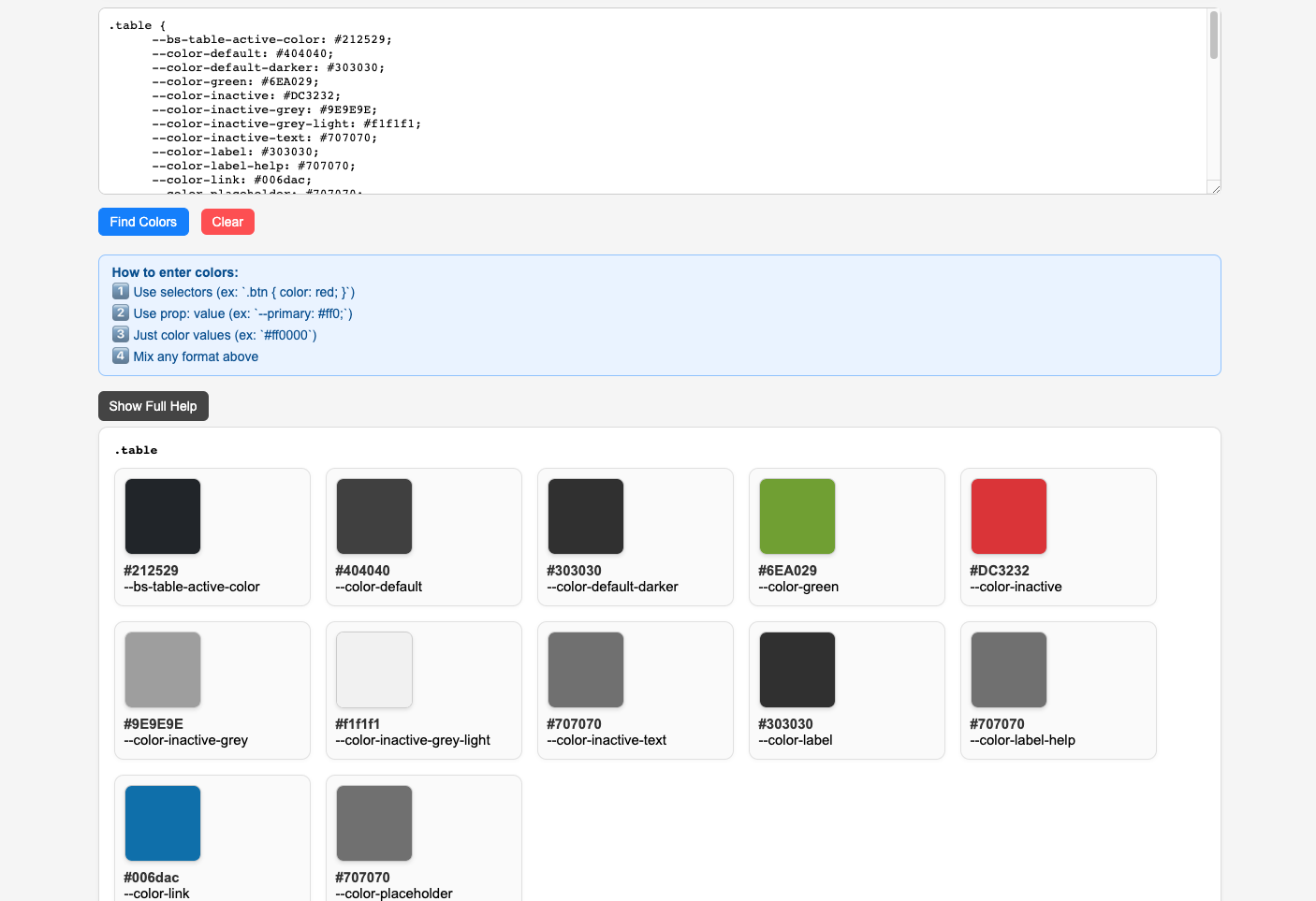
So I built something: CSS Color Finder — a tiny browser tool where you paste CSS, hit a button, and instantly get every color rendered as a visual swatch card, grouped neatly by selector or property.
Zero install. Zero sign-up. Zero frameworks. Just open it and use it.
What It Does
You paste CSS — any CSS — into the textarea. Could be:
- A full selector block with multiple properties
- A list of CSS custom properties (
--primary: #ff0000;) - Raw hex/rgb/hsl values, comma-separated
- A chaotic mix of all of the above
Hit Find Colors and the tool renders each color as a card showing:
- A visual color swatch (with a checkerboard background for transparent colors)
- The property name
- The exact value you pasted
Colors are grouped by their context — things inside a .button { } block get grouped under .button, standalone CSS variables go under [inline properties], and bare color values land in [inline colors].
Here’s what a typical output looks like when you paste something like:
.table  {

--color-green:  #6ea029;

--color-inactive:  #dc3232;

--color-link:  #006dac;

}


--active-color: #04ae93;

--background-color: #ffffff;


#FF5733,

#33FF57,

#3357FF;
You get three groups of swatch cards — one for .table, one for the inline properties, one for the raw hex list. It’s instantly scannable.
Why Vanilla JS? No React, No Vite, No Nothing
Honest answer: because the problem doesn’t need them.
This is a browser tool. The user pastes text, the tool parses it and renders some divs. That’s the whole feature surface. Reaching for a framework here would mean:
- A
package.jsonwith 40+ transitive deps - A build step to babysit
- A bundle to host
- Node version drama every six months
Instead, it’s one HTML file with a <script> tag. You can literally open it from your filesystem. The entire thing is readable in one sitting.
This is a reminder that not everything needs a stack. Sometimes a .html file is the right architecture.
How the Parser Works (The Interesting Bit)
The core is a function called parseCssTextToColorMap(cssText). It’s written from scratch — no CSS parser library, no regex one-liner. Here’s the high-level flow:
1. Line-by-line scan with brace depth tracking
The parser walks through the input line by line. It keeps a braceDepth counter. When it hits a {, depth goes up; when it hits }, depth drops. This tells it whether a line is inside a selector block or outside one.
if  (line.includes("{"))  {

braceDepth  =  1;

// parse selector name, collect colors from this block

}

if  (line.includes("}"))  {

braceDepth  =  0;

// seal off the block, push to results

}
2. Three routing paths for lines outside selector blocks
When a line appears at depth 0 (outside any selector), the parser checks:
- Does it look like a
prop: value;declaration? → goes to orphan properties ([inline properties]) - Does it look like a bare color or comma-separated color list? → goes to inline colors (
[inline colors])
3. Color detection via looksLikeColor(value)
The validator checks against:
- Hex:
#rgb,#rgba,#rrggbb,#rrggbbaa rgb()andrgba()with valid numeric rangeshsl()andhsla()with percentage saturation/lightness- A hardcoded set of named colors (
red,blue,transparent,currentcolor, etc.)
4. Comma-safe splitting
For comma-separated bare color lists, the parser uses a parenthesis-depth counter to avoid splitting inside rgb(64, 64, 64) at the wrong commas. This is the kind of edge case that bites you if you use a naive split(',').
for  (const  ch  of line)  {

if (ch  ===  "(") parenDepth++;

if (ch  ===  ")") parenDepth--;

if (ch  ===  ","  &&  parenDepth  ===  0) {

// safe to split here

}

}
5. Rendering
The result is an array of { selector, colors } objects. The renderer maps these to DOM — a selector-block div per group, a color-card div per color, with a CSS background color applied directly to the swatch element.
Nothing fancy. But it works reliably on real-world CSS.
The Use Cases That Surprised Me
I built this for one specific itch, but a few other uses turned up:
Auditing a design system — paste your token file (--color-* variables) and instantly see if your palette is coherent, if you’ve got near-duplicates, or if someone snuck in an off-brand color.
Reviewing a PR with CSS changes — paste the diff’s color values and actually see what changed rather than comparing hex strings mentally.
Extracting a color palette from someone else’s CSS — paste their stylesheet, see their colors, done.
Checking transparency — the checkerboard background on swatches makes it immediately obvious which colors have alpha channels.
What’s Coming Next
The tool is live and actively maintained at neps.in/pro. Two more tools are in the pipeline:
- Log Parser & Visualiser — paste server logs, filter by status code, endpoint, or error type, visualize response time distributions
- JSON Formatter & Diff — paste two JSON payloads side-by-side, see exactly what changed
Same philosophy: browser-native, no install, no build.
Try It
Live tool: neps.in/pro/css-color-finder/
Source: github.com/neps-in/cool-pro
Open it, paste some CSS from whatever you’re working on right now, and see what it spits out. If you hit an edge case where a color doesn’t get picked up correctly, that’s a bug — open an issue.
And if you’re a frontend dev who also builds small tools for your own workflow, I’d genuinely love to hear what you’ve made. The best dev tools are usually the ones someone built out of frustration on a Tuesday afternoon.
Built with pure HTML, CSS, and vanilla JavaScript. No frameworks, no build step, no dependencies.
Part of the Neps.in Cool Hacks collection — small tools for web developers.
